

You plan a perfect day on Sunday night. By Monday 10 a.m., two meetings have moved, an “urgent” email has eaten an hour, and the beautiful schedule is dead. This guide teaches time blocking the way it actually works — including the buffer math, the daily reshuffle, and the fixes that keep the system alive past the first ambush.
Time blocking is a scheduling method where you assign every part of your day to a specific task or type of work, in advance, on your calendar. Instead of working from a to-do list and deciding what to do moment by moment, you decide once — “9:00–10:30: write report, 10:30–11:00: email” — and then follow the calendar. Its power comes from making decisions before the day’s chaos, not during it.
Key Takeaways
- Time blocking assigns every hour a job in advance, replacing hundreds of small “what now?” decisions with one planning session.
- Plan only 60–70% of your available hours; the unplanned 30–40% is the buffer that absorbs Monday’s chaos instead of your schedule collapsing.
- Batch shallow tasks (email, messages, admin) into 2–3 fixed blocks a day rather than letting them leak into everything.
- The daily 10-minute reshuffle — reviewing and moving blocks each morning or evening — is the habit that separates people who stick with it from people who quit.
- A moved block is a rescheduled block, not a failed one; time blocking is a forecast you update, not a contract you break.
- Start with blocking only your mornings for two weeks before attempting full days.
What Time Blocking Is — and Why a To-Do List Alone Keeps Failing You
Time blocking means giving every task an appointment: a specific start time, a specific end time, a slot on your actual calendar. The method is old — Benjamin Franklin sketched his days into hourly blocks in his autobiography — and it’s the backbone of how many deep-work practitioners operate today. Cal Newport, the Georgetown computer science professor and author of Deep Work, plans every minute of his workday in blocks and has argued that a 40-hour time-blocked week can produce more than a 60-hour unstructured one. His reasoning holds up: structure eliminates the gaps where time silently disappears.


To see why the to-do list alone fails, look at what a list doesn’t say. A list says what needs doing. It says nothing about when, how long, or whether the day can actually hold it. So you write eleven items, complete four, and feel behind — every single day — not because you worked badly but because the list quietly promised 19 hours of work to an 8-hour day. A time-blocked calendar can’t make that lie. When you drag tasks onto real hours, the day’s true capacity stares back at you, and the overflow gets moved at planning time instead of discovered at 6 p.m.
There’s a second mechanism, and it’s the one people feel within days: decision elimination. An unstructured day forces a “what should I do now?” choice dozens of times, and each choice is an exit ramp toward email, feeds, or the easiest task. Psychologists studying self-control describe how each act of choosing draws on limited attention — and how pre-deciding (researchers call these implementation intentions: “at 9:00 I will do X”) dramatically raises follow-through compared with vague intentions. Time blocking is implementation intentions, industrialized. The 9 a.m. block doesn’t ask how you feel about the report. It just says: report, now.
One definition boundary before we build yours: time blocking is not the same as a packed calendar of meetings. Meetings are other people claiming your hours. Time blocking is you claiming them first.


How to Build Your First Time-Blocked Week (The 60–70% Rule Included)
Building a schedule that survives contact with Monday takes five steps and one counterintuitive rule: don’t block all of it.
Step 1: Map your fixed landscape. Put in everything already claimed — meetings, commute, school pickup, lunch. What remains is your real discretionary time, and for most employed people it’s a sobering 3–5 hours a day, not the imagined 8. Knowing the true number is half the method.


Step 2: Place your deep work blocks first, in your best hours. Deep work — a term from Newport meaning cognitively demanding, distraction-free effort — goes where your energy peaks. For most people that’s the first 2–4 hours of the morning; chronobiology research on circadian rhythms consistently finds analytic performance peaking in late morning for the majority. One or two 90-minute deep blocks placed in prime hours will outproduce a whole scattered afternoon. Guard them like meetings with your most important client, because they are.
Step 3: Batch the shallow work into 2–3 fixed containers. Email, messages, admin, scheduling — these tasks expand to fill whatever space they’re allowed. Give them fixed containers instead: 11:30–12:00, 16:00–16:30, and that’s it. Batching matters because of what attention researchers call attention residue — Sophie Leroy’s studies at the University of Washington showed that after switching tasks, part of your mind stays stuck on the previous one, degrading performance on the next. Every email checked mid-report costs more than the two minutes it took.
Step 4: Apply the 60–70% rule. Block only 60–70% of your discretionary hours; leave the rest visibly empty. This buffer is the load-bearing wall of the whole method. Planning fallacy research — Kahneman and Tversky’s finding that humans chronically underestimate task duration even when they know they chronically underestimate — guarantees your blocks will run over. The buffer is where overruns, surprises, and urgent requests land without toppling the rest of the day. Schedules blocked at 100% don’t survive Monday; that’s not a discipline problem, it’s arithmetic.
Step 5: Add the daily reshuffle — 10 minutes, every day. Each morning (or the evening before), review today’s blocks against reality: what moved, what landed, what matters most now. Rearrange, shrink, delete. This tiny ritual is the actual habit of time blocking. The calendar is a forecast; the reshuffle is how forecasts stay useful.
A sample first week, kept deliberately modest: block 8:30–12:00 only (one deep block, one shallow container, one buffer gap), leave afternoons unstructured. Run that for two weeks. Mornings-only blocking captures most of the method’s benefit at a fraction of the maintenance cost, and expanding a working system beats repairing an overambitious one.
Time Blocking vs. Timeboxing vs. Task Batching vs. Day Theming
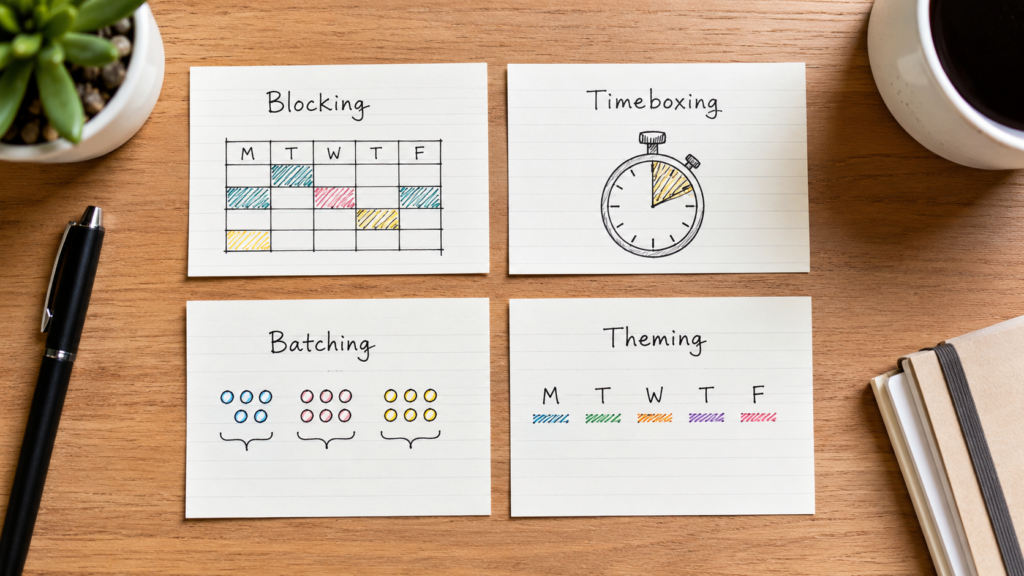
Four related methods get mixed up constantly, and knowing the differences lets you combine them properly instead of fighting them.
| Method | Core idea | Best for |
|---|---|---|
| Time blocking | Assign tasks to specific calendar hours in advance | Anyone whose day evaporates; knowledge workers with mixed task types |
| Timeboxing | Set a fixed maximum time for a task and stop when it ends | Perfectionists; tasks that expand endlessly (editing, research, polishing) |
| Task batching | Group similar small tasks and do them in one run | Email, admin, errands, content creation in bulk |
| Day theming | Give each day one dominant focus (Mon = marketing, Tue = product) | People juggling multiple roles or projects; founders, freelancers |
The distinctions in practice: time blocking says when you’ll write the report. Timeboxing adds a hard ceiling — “90 minutes, then it ships, polished or not” — which weaponizes Parkinson’s Law (work expands to fill the time available) in your favor instead of against you. Batching is a rule about grouping; it lives inside your blocks. Theming is blocking zoomed out to the week level.
They stack beautifully: a themed Tuesday (product day) containing time blocks (9:00–10:30 spec writing), one of which is timeboxed (10:30–11:00 review — hard stop), plus a batched admin container at 4 p.m. That’s not four systems; it’s one calendar with four good ideas in it.
If you’re only going to adopt one addition to plain time blocking, take timeboxing for your open-ended tasks. The hard stop is uncomfortable for about a week, then it quietly cures the perfectionism tax — the second hour of polishing that improves the work 4%.
Making Time Blocking Survive Real Life: Interruptions, Meetings, and Chaotic Jobs

A method that only works in a quiet home office is a toy; here’s how time blocking bends around jobs with meetings, bosses, kids, and genuine chaos. The core move for all of them: stop defending the plan and start defending the planning.
When interruptions hit mid-block: triage in five seconds — is this urgent and mine? If no, it goes to a “later list” you keep beside you, to be processed in the next shallow container. If yes, handle it, then reshuffle rather than resume pretending: the 9:00 block moves to 1:00, something small drops into the buffer, the day continues. A block that moved is a block that survived. The people who quit time blocking are almost always people who treated the first moved block as system failure.
When your calendar belongs to meetings: block what’s left, even if it’s ninety minutes. Then go on offense: many workers find 20–30% of their recurring meetings survive a polite “can I skip this one / can we make it async?” experiment. Protect at least one deep block by marking it busy on your shared calendar — colleagues don’t distinguish between “meeting with client” and “meeting with the quarterly report,” and they don’t need to.
When your job is genuinely reactive (support, management, on-call, parenting young kids): flip the ratio. Instead of blocking 70% and buffering 30%, block 30% and buffer 70%. Even two protected hours a day, placed where interruptions statistically dip — often early morning — transforms output. Managers can borrow a page from what some companies formalize as “maker time”: entire mornings company-wide where meetings are banned. You can declare a personal version even if your company won’t.
When energy, not time, is the constraint: block by energy type, not just task. Match creative work to your peak, administrative work to your trough (for most people, early-to-mid afternoon — the well-documented post-lunch dip), and calls to whichever you have left. An honest schedule built around your actual energy curve outperforms an aspirational one built for a robot. Harvard Business Review has covered this energy-management angle repeatedly; their piece on managing energy, not time is the classic starting point.
Tools, briefly, because they matter less than people hope: any calendar works — Google Calendar with color-coded block types is the default for good reason. Paper planners work. What matters is the reshuffle ritual, not the software. If you already keep a bullet journal, a hand-drawn daily timeline column does the same job.
Common Time Blocking Mistakes (That Even Productive People Make)
These are the failure modes of people who read the guides, built the calendar, and still watched it collapse — the intermediate-level traps.
1. Blocking at 100% capacity. The prettiest calendars fail first. A fully-blocked day has no crumple zone, so the first overrun triggers a cascade — every subsequent block is now late, the schedule visibly broken by noon, and the natural response is abandoning it entirely. Fix: the 60–70% rule, enforced visually. If your calendar has no white space, you haven’t planned; you’ve written fiction.
2. Estimating tasks at their best-case duration. “Write the proposal — one hour” means one hour if no research gap appears, no draft gets rewritten, and no colleague pings. Real proposals take two. Fix: track your actual times for one week (just jot start/finish), then apply your personal multiplier — most people discover theirs is 1.5–2x. Planning with your real multiplier feels pessimistic and performs like magic.

3. Treating the calendar as a contract instead of a forecast. Rigid blockers experience every deviation as failure, accumulate guilt, and quit within a month — the productivity version of abandoning a diet after one dessert. Fix: adopt the forecaster’s mindset explicitly. Meteorologists update forecasts hourly without shame; your 10-minute reshuffle is the same act. Success is measured weekly (“did the important work happen?”), never block-by-block.
4. Blocking tasks but not transitions. Six back-to-back blocks with no gaps ignores that humans need to stand up, that meetings run over by four minutes, and that attention residue needs a buffer to dissipate. The missing ten minutes between blocks is where whole schedules derail. Fix: 10–15 minute gaps between distinct blocks, treated as part of the system, not slack to be optimized away. Calendar apps’ “speedy meetings” settings (25/50-minute defaults) automate this.
5. Using identical block lengths for unequal work. The tidy one-hour grid treats deep strategy work and inbox cleanup as the same species. They aren’t: cognitively demanding work needs 90–120 minute blocks to get past the 15–20 minute warm-up phase, while shallow work does fine in 30. Uniform hour blocks systematically starve deep work of the runway it needs. Fix: size blocks to cognitive weight — long and few for deep work, short and contained for shallow.
FAQ
What is time blocking in simple terms? It’s putting your tasks on your calendar with specific start and end times, instead of working from a to-do list and deciding as you go. “9:00–10:30: write report” is a time block. You make the decisions once, during planning, and then follow the calendar — which removes dozens of “what should I do now?” moments where time usually leaks away.
How is time blocking different from a to-do list? A to-do list says what needs doing; time blocking adds when and for how long. That difference is everything: a list can silently contain 19 hours of work for an 8-hour day, and you find out by feeling behind at 6 p.m. A calendar can’t hide overcommitment — the overflow becomes visible while you’re planning, when you can still fix it.
How many hours of my day should I time block? Only 60–70% of your genuinely free hours — leave the rest visibly empty as buffer. Research on the planning fallacy shows people reliably underestimate how long tasks take, so a fully-blocked day collapses at the first overrun. The empty space absorbs surprises. If your job is highly reactive, flip it: block 30%, buffer 70%.
What do I do when my time blocks get interrupted? Triage fast: if it’s not urgent and yours, park it on a “later list” and return to the block. If it truly needs you now, handle it, then spend two minutes reshuffling the rest of the day — move the interrupted block, drop something into the buffer. A moved block is a success, not a failure. Quitting happens when people treat the first disruption as proof the system broke.
Is time blocking good for people with ADHD? Many people with ADHD find it among the more effective structures, because it externalizes decisions that working memory and executive function would otherwise juggle. The adaptations that help most: shorter blocks (25–45 minutes), generous buffers beyond the usual 30–40%, visual timers during blocks, and grace built in — the daily reshuffle matters far more than any individual block surviving.
How long should a time block be? Match the block to the work. Deep, cognitively demanding tasks need 90–120 minutes — the first 15–20 are just warm-up, and shorter blocks never reach full focus. Shallow work like email does best in tight 30-minute containers that prevent expansion. The common mistake is a uniform one-hour grid, which starves deep work and overfeeds shallow work.
Closing
Time blocking works for one unglamorous reason: it moves your decisions to a calm moment and forces your day’s real capacity into the open, where a to-do list lets both hide. Keep 30–40% of the day unblocked, reshuffle for ten minutes each morning, and treat every moved block as the system flexing rather than failing. Tomorrow morning, block just the hours before noon — one deep block, one shallow container, one gap — and see what Monday looks like when it’s been decided in advance.